
CheckListy is a personal iOS project built to explore modern development practices with SwiftUI.
The project focuses on experimenting with Clean Architecture, real-time synchronization with Firebase, and voice-based interaction, while maintaining a scalable and maintainable codebase structure.
Rather than building just another to-do list, the goal was to create a small but realistic application where different technologies could interact in a real scenario — including cloud synchronization, reactive UI updates, offline support, and voice commands.
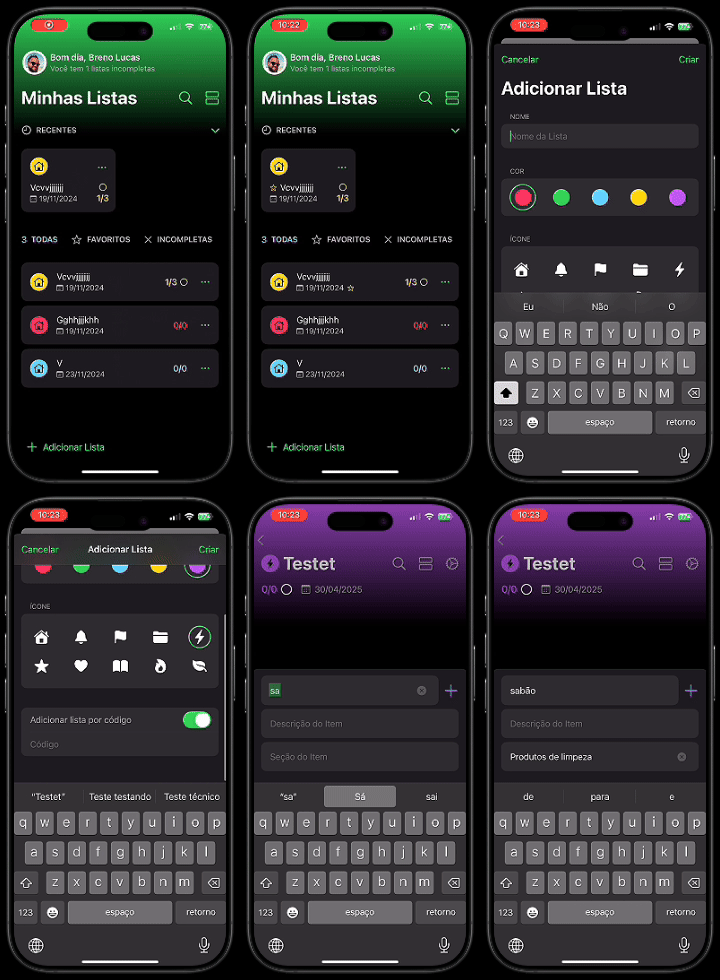
Project Snapshot
| Category | Details |
|---|---|
| Project Type | Personal iOS Project |
| Main Goal | Explore modern iOS architecture and cloud integration |
| Platform | iOS |
| UI Framework | SwiftUI |
| Architecture | Clean Architecture + MVVM |
| Backend | Firebase (Auth, Realtime Database, Storage) |
| Local Storage | Realm |
| Reactive Layer | Combine |
| Special Feature | Voice-controlled task management |
| Design Tool | Figma |
Project Goals
The main goals of this project were:
- Explore Clean Architecture + MVVM in a real application
- Implement real-time synchronization using Firebase
- Experiment with voice commands for task management
- Use modern SwiftUI navigation patterns
- Practice building apps with cloud services and offline persistence
- Apply basic security practices before making the repository public
What I Explored in This Project
This project served as a playground to experiment with different technologies and architectural approaches.
Real-Time Sync with Firebase
One of the core features of CheckListy is real-time data synchronization.
The application uses Firebase Realtime Database to keep task lists synchronized across devices. Whenever a task is created, edited, or completed, the update is instantly reflected for anyone who shares the same list.
Firebase is also used for several complementary services:
- Firebase Authentication for user accounts
- Google Sign-In for quick onboarding
- Firebase Storage for profile image storage
Firebase’s built-in offline persistence allows the application to continue working without an internet connection. Any changes made offline are automatically synchronized when connectivity is restored.
Clean Architecture + MVVM
To keep the codebase organized and scalable, the project follows Clean Architecture combined with MVVM.
The application is divided into three layers.
Domain Layer
The Domain layer contains:
- Core entities
- Business rules
- Use cases
- Repository interfaces
This layer does not depend on frameworks such as Firebase or SwiftUI.
Data Layer
The Data layer implements the repository interfaces and handles external integrations such as:
- Firebase services
- Network operations
- Local persistence
This separation keeps infrastructure concerns isolated from business logic.
Presentation Layer
The Presentation layer handles the user interface using:
- SwiftUI views
- ViewModels
- Reactive state management
ViewModels act as the bridge between the UI and domain logic, exposing observable state for SwiftUI views.
Modern SwiftUI Navigation
The project uses SwiftUI’s type-based navigation system through navigationDestination.
This modern approach provides:
- Type-safe navigation
- Declarative routing
- Cleaner navigation logic
- Reduced runtime navigation errors
It also simplifies managing navigation flows across multiple screens.
Voice Commands with Apple’s Speech Framework
One of the most interesting experiments in this project was integrating Apple’s Speech framework.
Users can manage tasks using simple voice commands such as:
"Buy milk OK"→ marks the task as completed"Buy milk No"→ marks the task as incomplete"Buy milk Não"→ also marks the task as incomplete
Although simple, this feature demonstrates how hands-free interaction can be integrated into productivity tools.
Local Caching with Realm
While most data is stored in Firebase, the project uses RealmSwift to locally cache the user’s profile image.
This improves performance by avoiding unnecessary network requests and ensures the image loads instantly when the application starts.
Core Features
Some of the implemented features include:
- Add and edit tasks quickly
- Real-time synchronization across devices
- Share lists with other users
- Voice commands to mark tasks as complete
- Firebase authentication
- Google Sign-In support
- Profile image storage using Firebase Storage
- Offline persistence with automatic synchronization
- Local image caching using Realm
- Ability to delete all local and remote user data
Technical Challenges
During development, a few interesting technical challenges appeared.
Real-time State Synchronization
Managing UI updates with real-time database changes required careful state handling in SwiftUI.
The solution was to rely on Combine publishers inside the ViewModels to propagate Firebase updates reactively to the UI.
This allowed the interface to update automatically whenever the database changed, keeping UI state synchronized with backend data.
Voice Command Interpretation
Speech recognition does not always produce consistent results.
To make commands more reliable, the system parses the recognized text and looks for task names combined with confirmation keywords such as:
OKNoNão
This lightweight parsing strategy keeps the feature simple while remaining practical.
Managing Offline and Online States
Since Firebase supports offline persistence, it was important to ensure the UI remained consistent when the network connection changed.
Testing included scenarios such as:
- Creating tasks while offline
- Reconnecting after network loss
- Verifying automatic synchronization
Security Considerations
Before making the repository public, several security precautions were implemented.
Credential Protection
The Firebase configuration file:
was removed from version control to prevent exposing project configuration publicly.
Although Firebase client keys are not strictly secret, avoiding committing configuration files is still a good security practice.
Environment Configuration
A .env.example file was added to demonstrate how developers can configure the environment locally without exposing sensitive configuration values.
Git Ignore Hardening
The repository ignores several sensitive files, including:
.envGoogleService-Info.plist- Firebase admin SDK credentials
This prevents accidental leaks when working with public repositories.
Firebase Security Rules
Custom Firebase Realtime Database rules were implemented to enforce basic access control.
These rules ensure that:
- Only authenticated users can access the database
- Users can only read and write their own profile data
- Basic validation prevents malformed data writes
These protections follow the principle of least privilege.
What I Learned
This project reinforced several important concepts in modern iOS development.
Some key takeaways include:
- Clean Architecture helps maintain long-term scalability
- Reactive state management simplifies UI synchronization with backend updates
- SwiftUI navigation becomes easier with type-based routing
- Cloud integrations require proper security and configuration management
- Small features such as voice commands can greatly improve user experience
Overall, this project was a great opportunity to experiment with architectural decisions and Apple frameworks in a real application.
Screenshots










Design
The UI and user experience were fully designed in Figma before development started.
You can explore the design file here:
👉 https://www.figma.com/design/CpSMTh3IYpecddNpsixDkR/CheckListy---Public-Preview?node-id=2-12798
Tech Stack
- Swift
- SwiftUI
- Firebase Authentication
- Firebase Realtime Database
- Firebase Storage
- Google Sign-In
- Combine
- Apple Speech Framework
- RealmSwift
Future Improvements
Some ideas that could be explored in future iterations include:
- Push notifications for shared list updates
- Improved voice command parsing using NLP techniques
- Unit tests for domain use cases
- UI snapshot tests
- Migration from Realtime Database to Firestore
- iOS Widgets for quick task updates